Web Push setup
Web Push is a standard (RFC 8030 protocol, RFC 8291 encryption, RFC 8292 VAPID) implemented by Chrome, Edge, Firefox, Safari — and iOS Safari for installed PWAs. One implementation reaches all of them; only the push service host in the endpoint differs.
Part A — VAPID key pair
The pair identifies your server to the push services. Generate it once per app and never change it.
Dashboard: Credentials › Web Push → enter a subject → Generate VAPID key. The public key appears on the card.
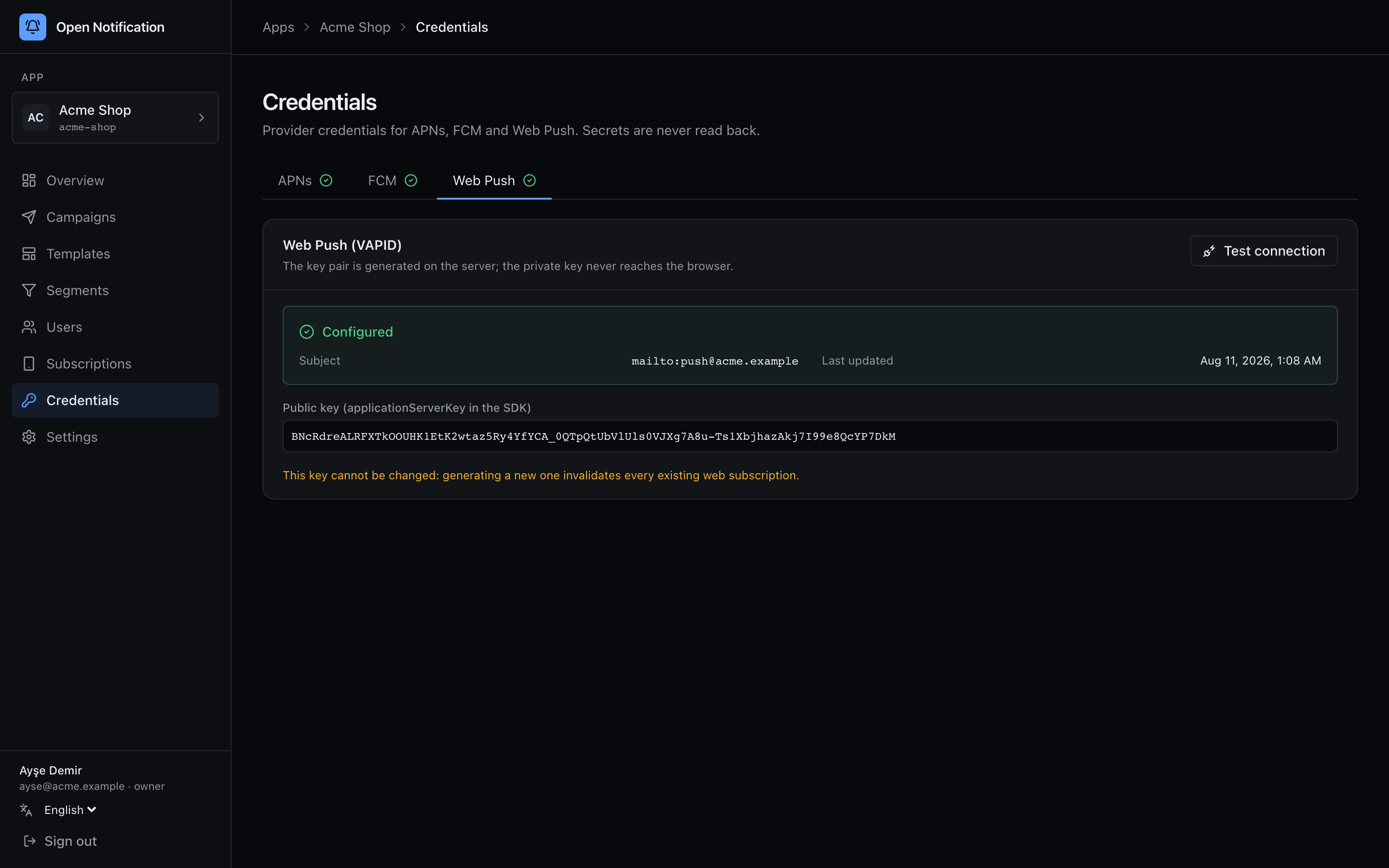
Command line:
bun run generate:keys -- --vapid
# VAPID_PUBLIC_KEY=BNcRd…
# VAPID_PRIVATE_KEY=…

bun run app:create -- --name "Acme" --slug acme \
  --vapid-public "BNcRd…" --vapid-private "…" \
  --vapid-subject mailto:[email protected]
The subject is a mailto: or https:// URL a push-service operator can use to contact you if your traffic misbehaves.
Each browser subscription is bound to the applicationServerKey it was created with. Change the key and every existing subscription silently dies. The dashboard will not let you regenerate a configured pair for this reason.
Part B — Your site
1 HTTPS. Service workers and push require a secure context (localhost excepted).
2 A web app manifest, linked from every page, with display: standalone or fullscreen. Chrome and Safari only treat the site as installable — and iOS only delivers push — when this is present.
{
  "name": "Acme Shop",
  "short_name": "Acme",
  "start_url": "/?source=pwa",
  "display": "standalone",
  "background_color": "#000000",
  "theme_color": "#000000",
  "icons": [
    { "src": "/icons/192.png", "sizes": "192x192", "type": "image/png" },
    { "src": "/icons/512.png", "sizes": "512x512", "type": "image/png" },
    { "src": "/icons/512-maskable.png", "sizes": "512x512", "type": "image/png", "purpose": "maskable" }
  ]
}
<link rel="manifest" href="/manifest.json">
3 A service worker at the site root (/sw.js). The Web SDK ships a prebuilt one; see Web SDK › The service worker. It must be served from the scope it should cover — /sw.js, not /static/js/sw.js.
4 Allow your origin on the API: add it to CORS_ORIGINS (https://www.acme.example). Browsers call /v1/subscriptions and /v1/e/* directly.
Part C — Subscribe from a click
The browser permission prompt must be triggered by a user gesture. Called on page load it is silently denied in Safari and increasingly throttled elsewhere.
import { init } from "@opennotification/web";

const on = init({
  endpoint: "https://push.acme.example",
  appKey: "pk_live_…",
  vapidKey: "BNcRd…",         // the public key from Part A
});

button.addEventListener("click", async () => {
  const result = await on.subscribe("user_123");   // or subscribe({ externalId, tags, language })
  if (!result.ok) console.warn(result.error.code);
});
iOS Safari — read this before you ship
Since iOS 16.4 Safari supports web push, but only for a web app added to the Home Screen. In an ordinary Safari tab window.PushManager does not exist at all, and no code changes that.
| Requirement | Notes |
|---|---|
| iOS ≥ 16.4 | Earlier versions have nothing. |
Manifest with display: standalone / fullscreen | Otherwise "Add to Home Screen" makes a bookmark, not a PWA. |
| User taps Share → Add to Home Screen | No programmatic install, no beforeinstallprompt on iOS. You must show them how. |
Notification.requestPermission() inside a tap handler | Anything else is silently rejected. |
| Opened from the Home Screen icon | The same site in a Safari tab is a different context with no push. |
The Web SDK detects this state (capability().reason === "IOS_NEEDS_INSTALL") and includes a ready-made install guide (mountInstallPrompt) in English and Turkish. Skipping the guide takes iOS web push conversion to zero.
Unsupported on iOS and ignored: actions (buttons), image, silent, renotify, vibrate. Supported: title, body, icon, badge (app icon count via the Badging API), tag, data.
Browser matrix
| Browser | Push | Requirement | Notes |
|---|---|---|---|
| Chrome / Edge / Brave (desktop) | ✅ | HTTPS | Full support, 2 action buttons |
| Firefox (desktop) | ✅ | HTTPS | Full support |
| Safari (macOS 13+) | ✅ | HTTPS | No action buttons |
| Chrome / Samsung Internet / Firefox (Android) | ✅ | HTTPS | Full support |
| Safari (iOS 16.4+) | ⚠️ | Installed PWA | Limited features, see above |
| Chrome / Firefox / Edge (iOS) | ❌ | — | WebKit shells; cannot install a PWA |
Payload limits and encryption
Every push is encrypted for that one subscription (RFC 8291 aes128gcm) by the worker. The push services cap the encrypted body at 4 KB; with the record size the server uses, the usable plaintext is 3 993 bytes. Long bodies plus a big data object hit this; the wizard shows the byte count as you type, and an oversized payload fails as 413/PAYLOAD_TOO_LARGE without being sent.
Error handling on the server
| Status | Worker action |
|---|---|
201 | Delivered to the push service. |
404, 410 | Subscription gone. Invalidated, never retried. |
413 | Too large. Permanent for that push. |
429 | Honours Retry-After, up to 3 attempts. |
400, 401, 403 | VAPID or payload problem — check the subject and that the key matches the one the site subscribed with. |
If a browser silently re-issues a subscription (pushsubscriptionchange), the SDK's service worker calls POST /v1/subscriptions/rotate and the row is updated instead of lost.