iOS — APNs setup
Open Notification talks to Apple directly over HTTP/2 with a token-based (.p8) authentication key. One key serves every app on your team and both the sandbox and production environments — there is nothing to renew every year.
Part A — Create the key in the Apple Developer portal
1 Sign in at developer.apple.com/account with an account that has the Admin or Account Holder role (App Managers cannot create keys).
2 Open Certificates, Identifiers & Profiles → Keys in the left sidebar.
3 Click the + button next to the Keys heading.
4 Give the key a name you will recognise later (e.g. Open Notification APNs) and tick Apple Push Notifications service (APNs).
Since 2024 the APNs checkbox has a Configure button offering Sandbox & Production or Sandbox only. Choose Sandbox & Production.
5 Click Continue, review, then Register.
6 Click Download. You get AuthKey_XXXXXXXXXX.p8. Apple lets you download it exactly once. Store it somewhere safe (a password manager's file attachment is ideal). If you lose it, revoke the key and create a new one.
7 Note the three identifiers you now need:
| Identifier | Where to find it | Looks like |
|---|---|---|
| Key ID | On the key's page under Keys, and in the filename. | 7K3M9PQ2XB (10 chars) |
| Team ID | Top-right of the developer portal, under your name; also under Membership details. | A1B2C3D4E5 (10 chars) |
| Bundle ID | Xcode → target → General → Bundle Identifier; or Identifiers in the portal. | com.acme.shop |
Part B — Enable push in the app
8 Make sure the App ID has the Push Notifications capability: Certificates, Identifiers & Profiles → Identifiers → your app → tick Push Notifications → Save. (Xcode does this for you when you add the capability with automatic signing.)
9 In Xcode select the app target → Signing & Capabilities → + Capability and add:
- Push Notifications
- Background Modes → tick Remote notifications
10 Add a Notification Service Extension target (File → New → Target… → Notification Service Extension). Without it there is no delivered event, no image and no action buttons on iOS. The SDK ships a drop-in NotificationService.swift; wiring is in the iOS SDK page.
Part C — Upload the key to Open Notification
Either in the dashboard — Credentials › APNs:
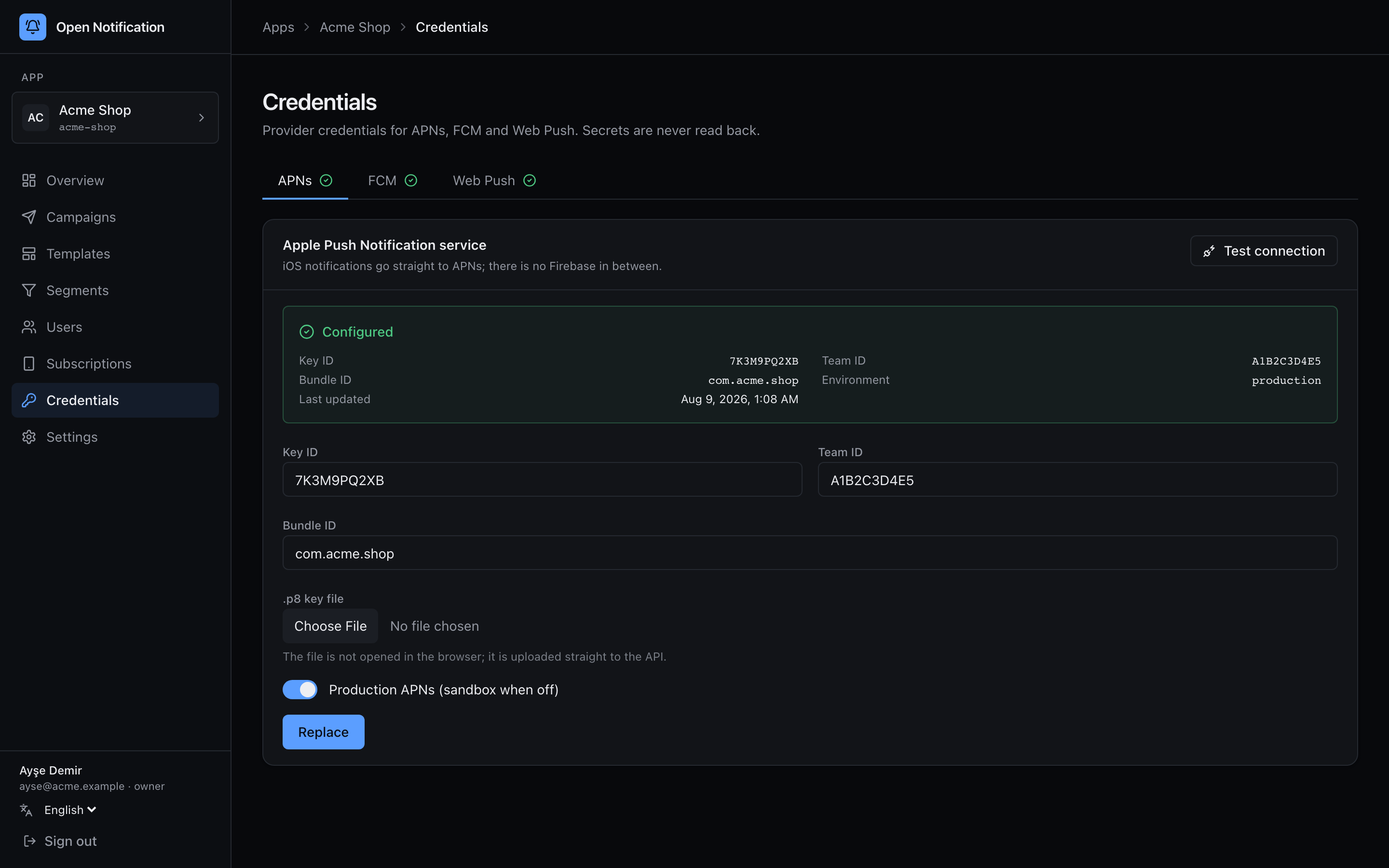
…or from the command line:
bun run app:create -- --name "Acme" --slug acme \
  --apns-p8 ./AuthKey_7K3M9PQ2XB.p8 \
  --apns-key-id 7K3M9PQ2XB \
  --apns-team-id A1B2C3D4E5 \
  --apns-bundle-id com.acme.shop \
  --apns-production
The .p8 is sealed with ENCRYPTION_KEY on arrival and never returned by any API.
Sandbox vs. production
| Build | Host | Setting |
|---|---|---|
| Xcode debug build, TestFlight internal builds signed with a development profile | api.sandbox.push.apple.com | Production APNs off |
| App Store, TestFlight (App Store distribution), Ad Hoc | api.push.apple.com | Production APNs on |
A token from one environment is rejected by the other with BadDeviceToken. If you need both at once, create two apps in Open Notification (acme and acme-dev) with the same .p8 and different settings.
Part D — Verify
11 Press Test connection on the credentials page. The API signs a JWT with your key and sends to a deliberately invalid token:
| Result | Meaning |
|---|---|
✅ BadDeviceToken | Apple authenticated you and rejected the fake token. Your key, Key ID, Team ID and Bundle ID are all right. |
❌ InvalidProviderToken | Key ID / Team ID / .p8 do not match each other. |
❌ TopicDisallowed / 403 | The key is valid but may not send to this Bundle ID — check the App ID's push capability, or the key was created without APNs. |
❌ MissingProviderToken | The .p8 file is empty or not PEM. |
What the server sends
For reference, the payload a device receives:
{
  "aps": {
    "alert": { "title": "New match", "body": "3 people liked you" },
    "sound": "default",
    "badge": 1,
    "mutable-content": 1,
    "thread-id": "matches",
    "interruption-level": "time-sensitive",
    "category": "on_66f1a…"
  },
  "on": {
    "m": "<signed msgId>",
    "c": "<campaignId>",
    "url": "acme://matches",
    "img": "https://cdn.example.com/x.jpg",
    "d": { "screen": "matches" },
    "a": [{ "id": "view", "title": "View" }]
  }
}
mutable-content: 1 is always set — it is what wakes the extension. interruption-level is time-sensitive for priority: "high" and active otherwise, matching apns-priority 10 / 5. A silent notification has no sound key (that is what presentation.sound = "none" produces). apns-collapse-id and apns-expiration come from collapseId and ttl.
Error handling on the server
| APNs reason | Worker action |
|---|---|
BadDeviceToken, Unregistered, DeviceTokenNotForTopic | Subscription invalidated. Never retried. |
ExpiredProviderToken | JWT refreshed, retried. |
TooManyRequests, ServiceUnavailable | Retried with exponential backoff, up to 3 attempts. |
TooManyProviderTokenUpdates | Would only happen if a JWT were refreshed more than every 20 minutes; the worker caches it per app. |