Campaigns
Campaigns lists every send for the app and hosts the wizard that creates new ones. Transactional notifications sent from the API appear in the same list with their own report.
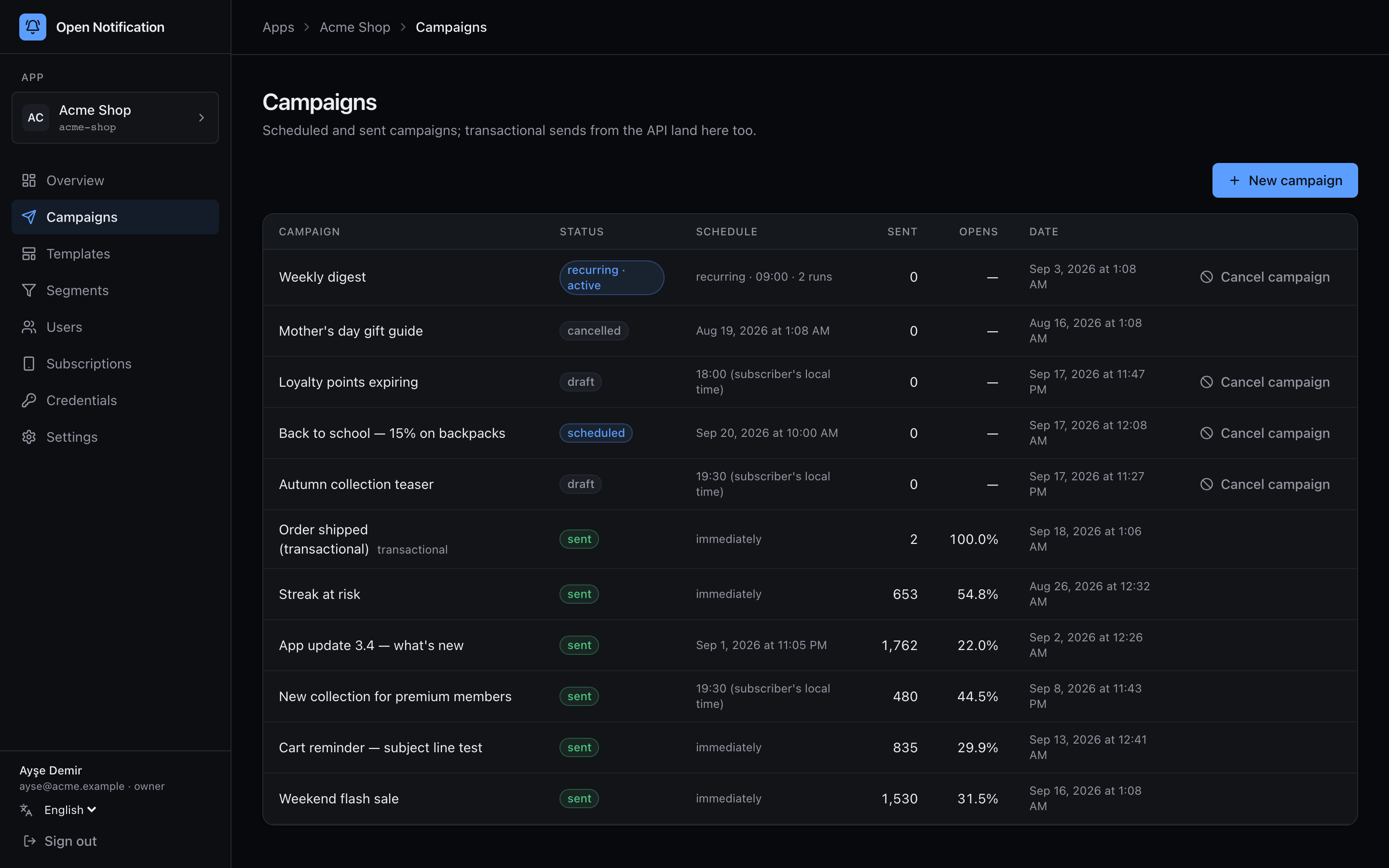
Columns: name, status badge, Schedule, Sent, Opens (open rate). Click a row for its report. Drafts and scheduled campaigns have an Cancel campaign button; nothing else can be cancelled, because once fan-out starts the jobs are already spread across the queues.
| Badge | Status | Meaning |
|---|---|---|
| draft | draft | Wizard started; not everything is filled in. Open it to continue. |
| scheduled | scheduled | Waiting for its time as a delayed job in Redis. Cancellable. |
| sending | sending | Fanning out / pushes in flight. The report auto-refreshes. |
| sent | sent | Fan-out done; every push has been attempted. |
| cancelled | cancelled | Cancelled before fan-out. |
| failed | failed | Fan-out itself failed (e.g. no credentials for a platform in the audience). |
| recurring · active | active | A recurring campaign whose schedule is live. It never sends itself; each tick creates a run, listed on its report page. |
The wizard
Click + New campaign. Four steps, each in the URL (?step=segment|content|preview|schedule) so the browser's back button walks the wizard and a reload lands where you were.
The first change creates a campaign row with status draft and puts its id in the URL (?draft=…). Every step change saves, and typing saves 1.5 s after you stop. Close the tab; it will be in the list.
1 Audience
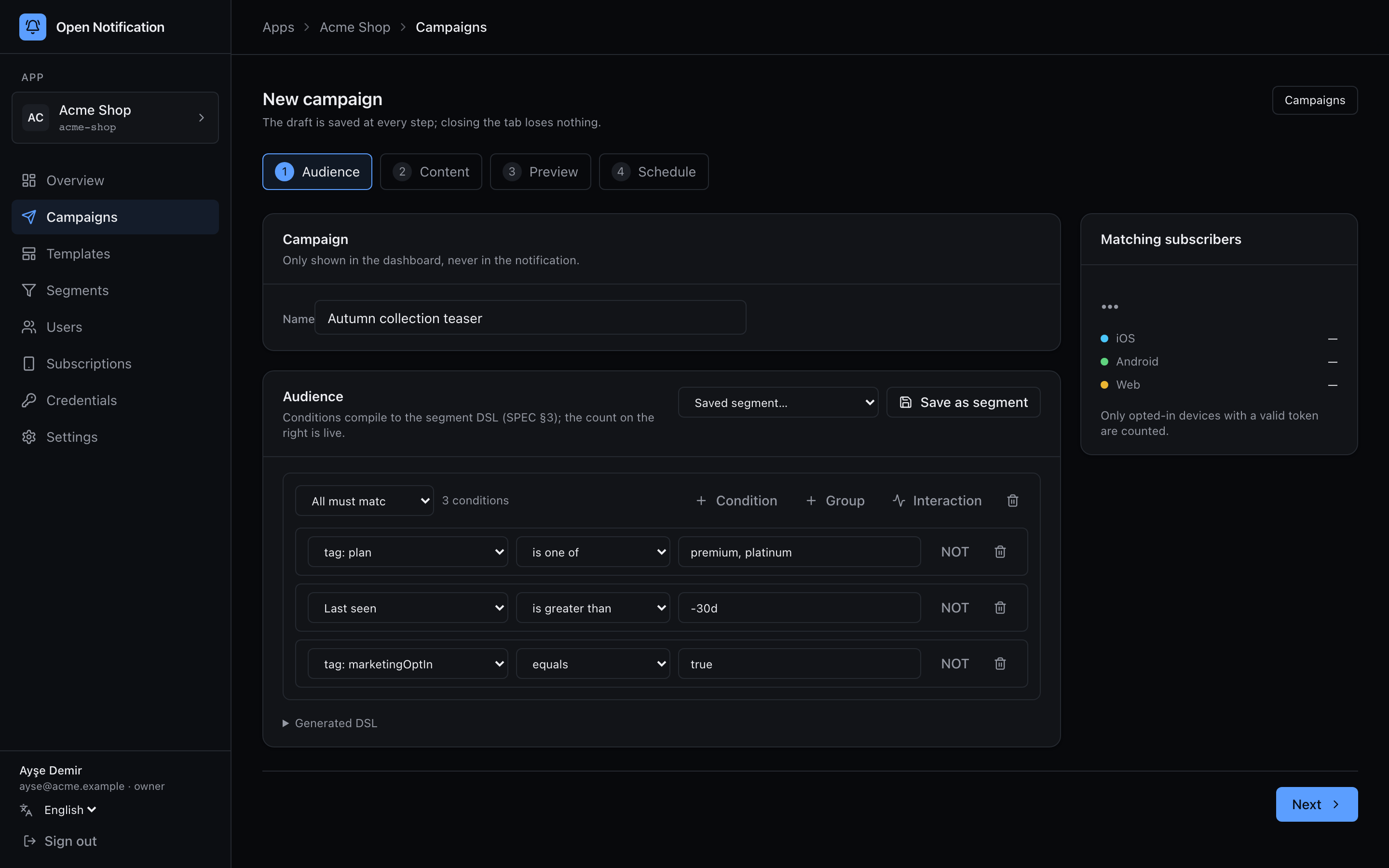
- Name — the campaign's name. Internal; not shown to users.
- The segment builder. A group is All must match (all of / AND) or Any may match (any of / OR). + Condition adds a condition, + Group nests another group. Each condition is a field, an operator and a value; NOT negates it.
- Fields offered: platform, country, language, timezone, subscription status, Last seen (last active), Last session / Session count (sessions), Last opened, Last notified, Created, app / OS version, device model, browser — and every tag key the audience actually has (
tag: plan,tag: streak…), with suggestions taken from real values. - + Interaction adds a behavioural condition: campaign X was opened / clicked / delivered / sent (optionally within
-30d); NOT turns it into "did not". Only campaigns that have been sent are offered. - Saved segment… loads a saved segment; Save as segment stores the current tree under a name. Editing a loaded segment detaches it — the campaign keeps its own copy.
- Dates take absolute values (
2026-08-01) or relative ones (-7d,-12h). - Matching subscribers on the right is a live count, by platform, of opted-in devices with a valid token. It re-queries as you edit.
- Generated DSL expands to the JSON that will be stored — the same segment DSL the API accepts, so you can copy it into a
POST /v1/campaignsbody.
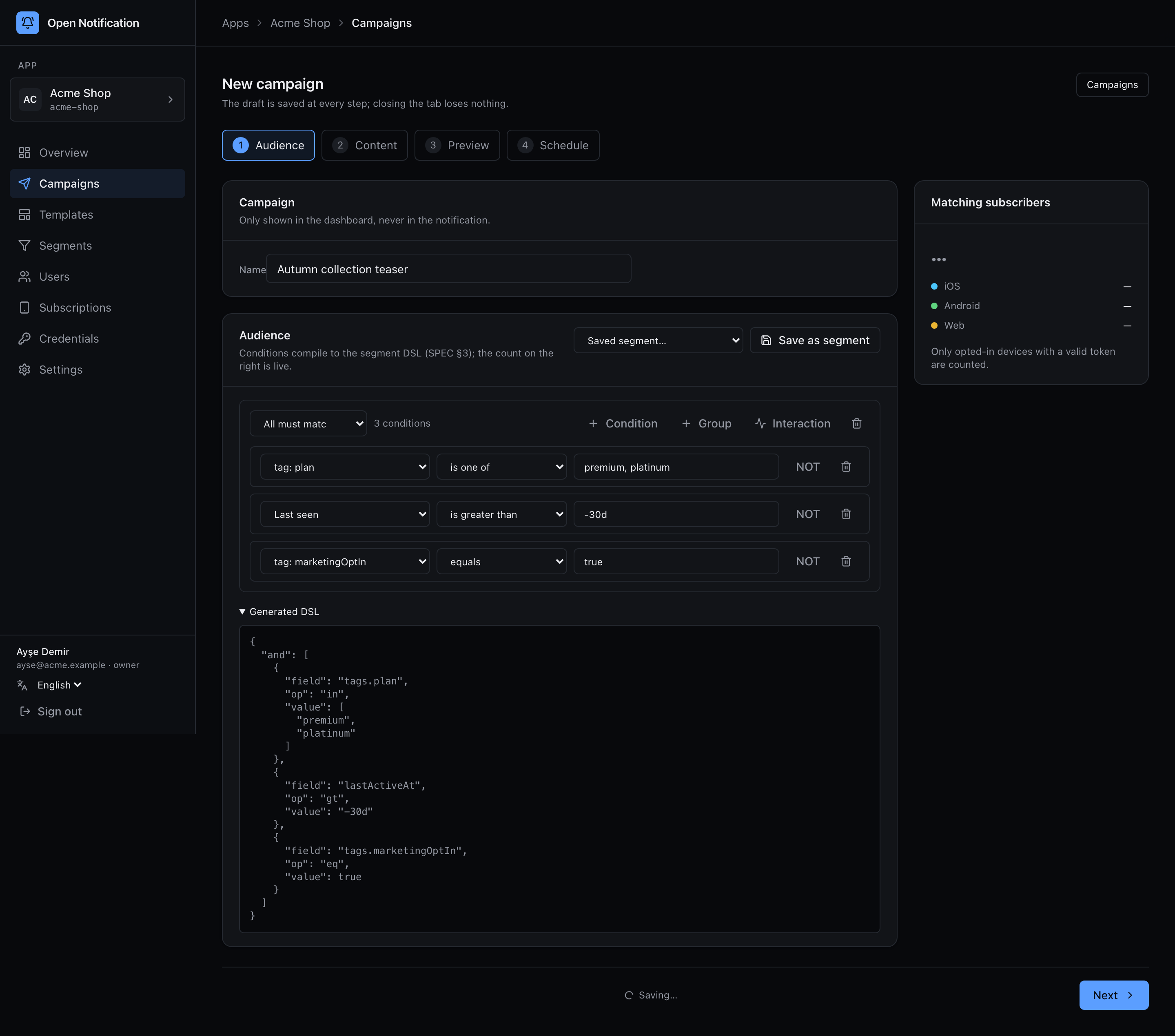
Leave the builder empty to target everyone.
2 Content
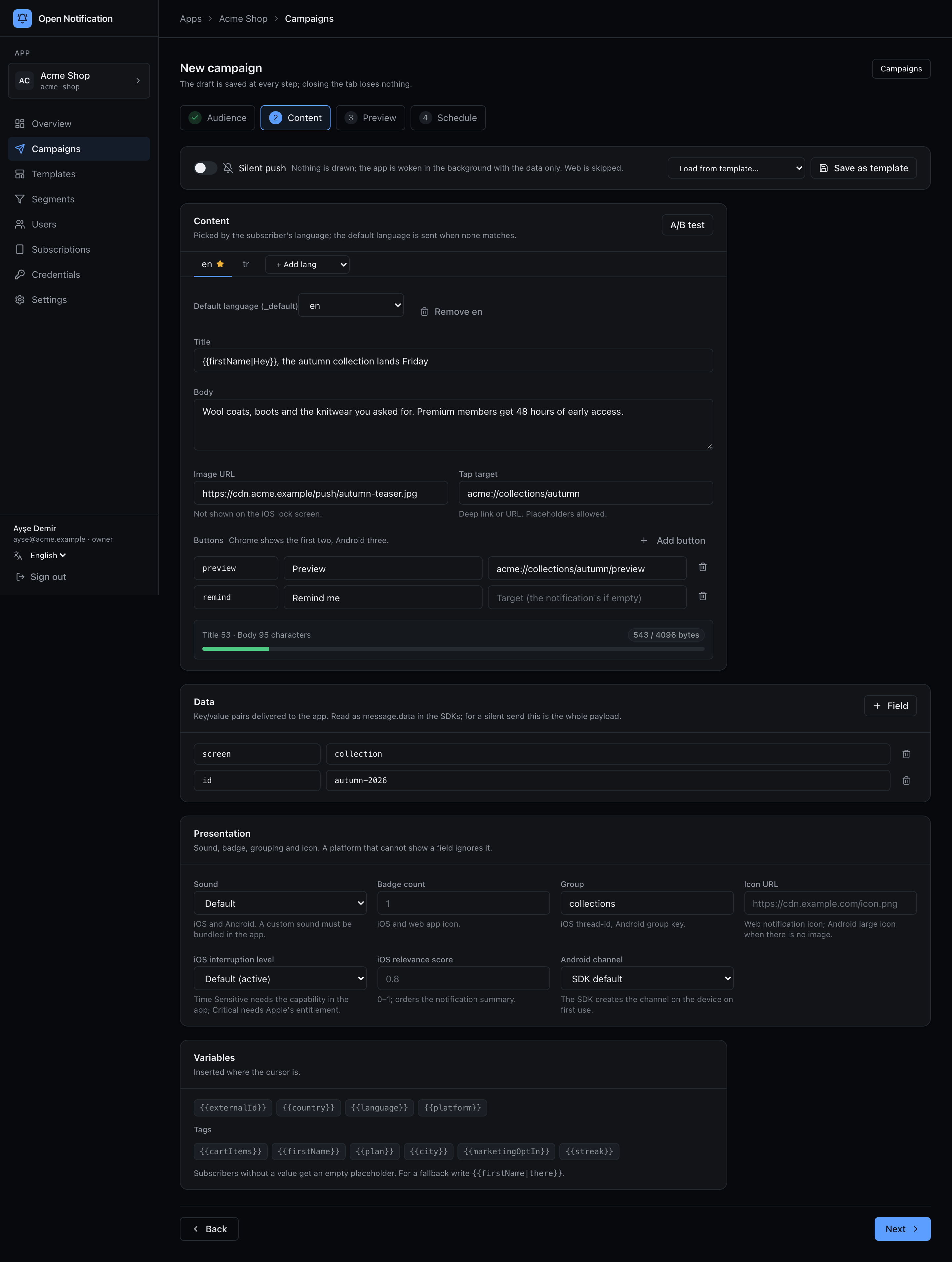
Content is per locale. Tabs across the top: en ★, tr, + Add language. The starred one is _default — what a subscriber gets when none of the locales match their language.
| Field | Notes |
|---|---|
| Title / Body | Title (≤ 200) and body (≤ 1000). Placeholders like `{{firstName |
| Image URL | Big picture. Android and web show it; iOS shows it via the Notification Service Extension; not on the iOS lock screen. |
| Tap target | Deep link or URL opened on tap. Placeholders allowed. |
| Buttons | Up to three action buttons: id, title, optional URL (falls back to the notification's). Chrome shows two, Android three, iOS up to four. |
| Byte meter | Web push payloads are capped at 4 KB; the bar shows the encrypted size of the current locale. |
Above the copy, a strip: Silent push (background push — nothing is drawn, the app gets the Data payload; web is skipped; the copy fields are greyed out), Load from template… and Save as template (see Templates).
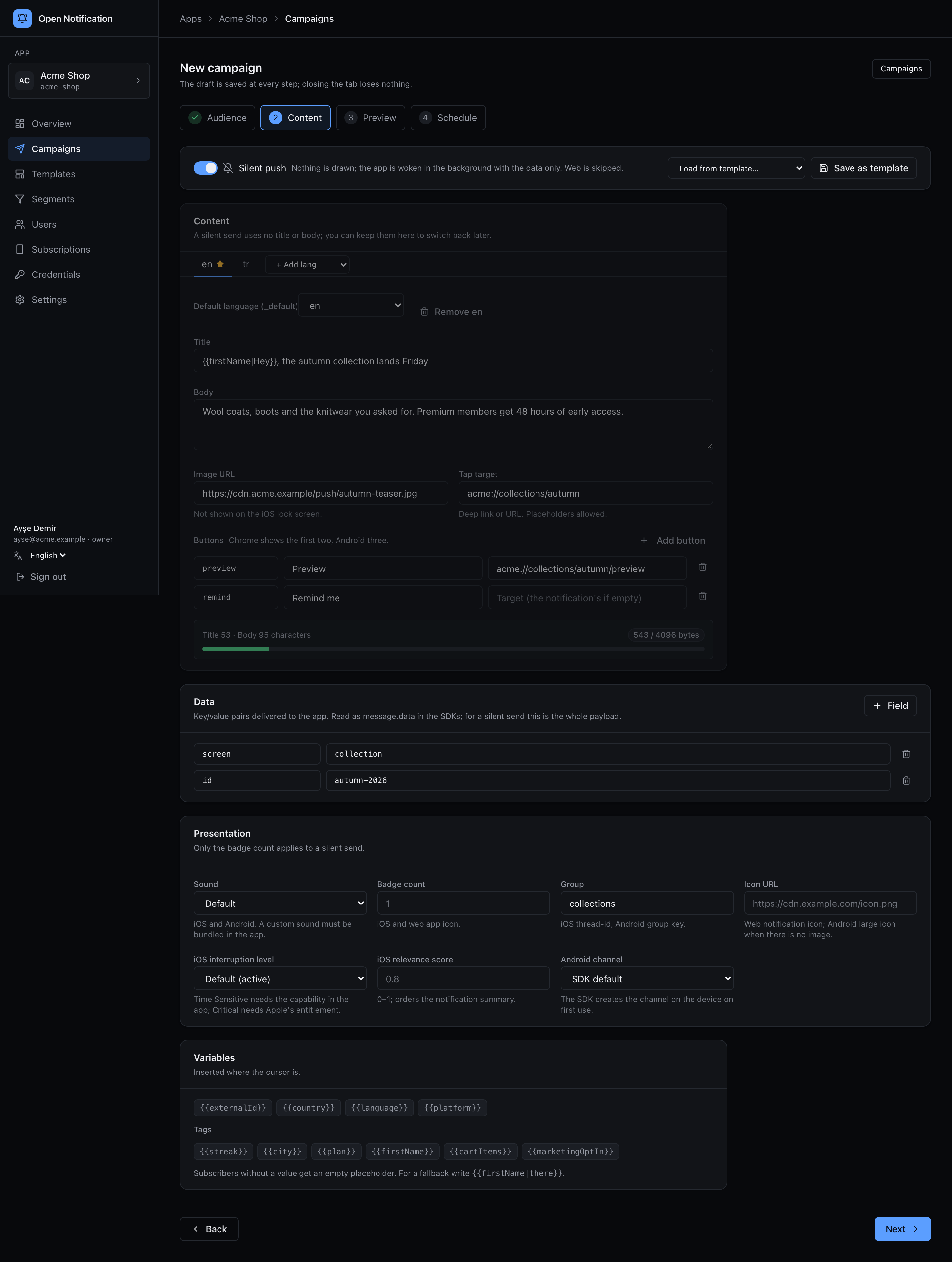
Below the copy:
- Data — the
datakey/value pairs delivered with the push (message.datain the SDKs). For a silent push this is the whole message. - Presentation — sound (Default / None / custom file name), badge count, group (
thread-idon iOS, group key on Android), web icon URL, iOS interruption level (interruption level: passive / active / time-sensitive / critical), iOS relevance score (relevance score), Android channel (one of the app's channels). Platforms ignore what they do not support. - Variables — chips for the built-ins (
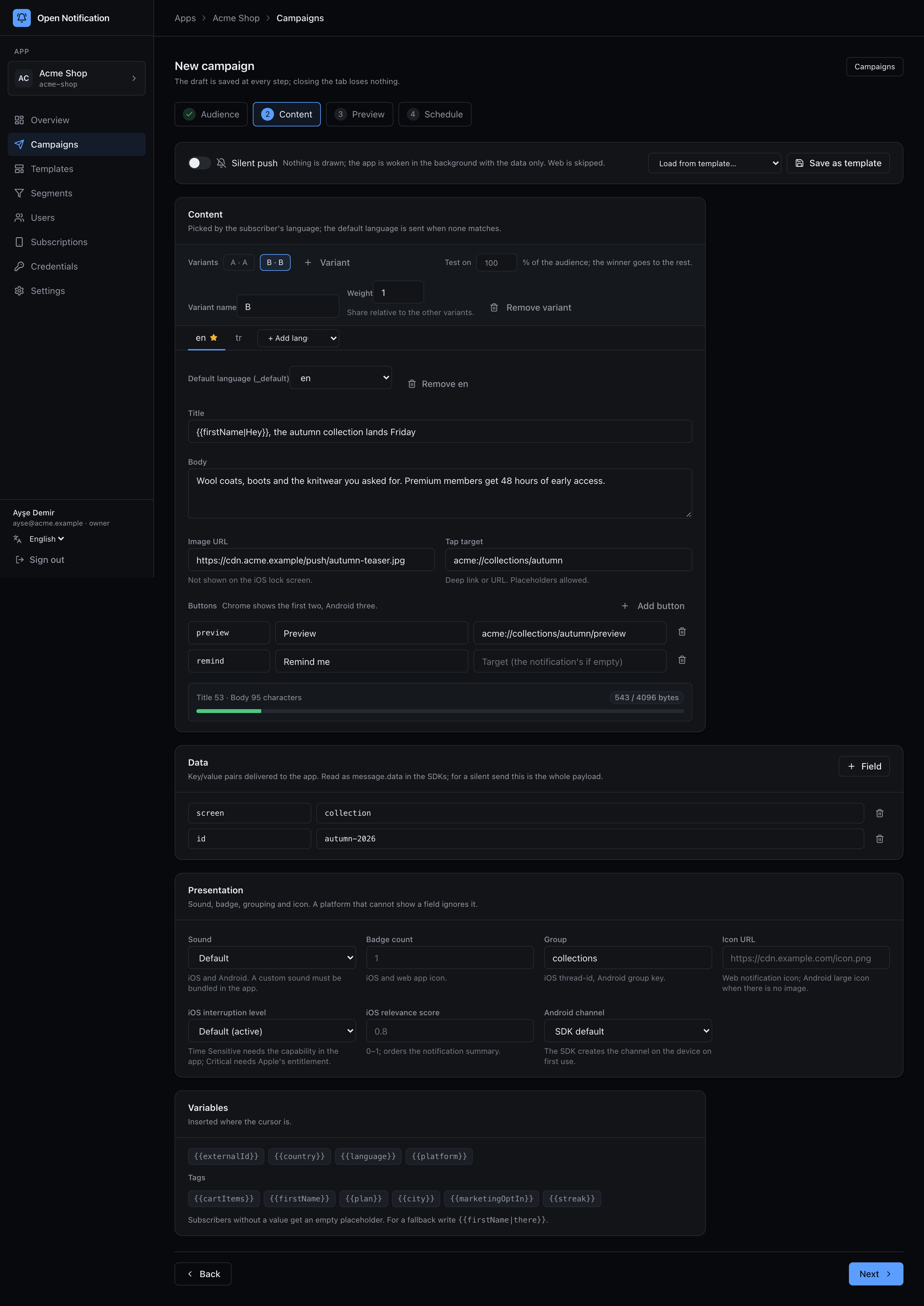
{{externalId}},{{country}},{{language}},{{platform}}) and every tag key seen in the audience. Clicking one inserts it at the cursor. - A/B test — turns the content into an experiment with 2–4 variants; see A/B testing.
3 Preview
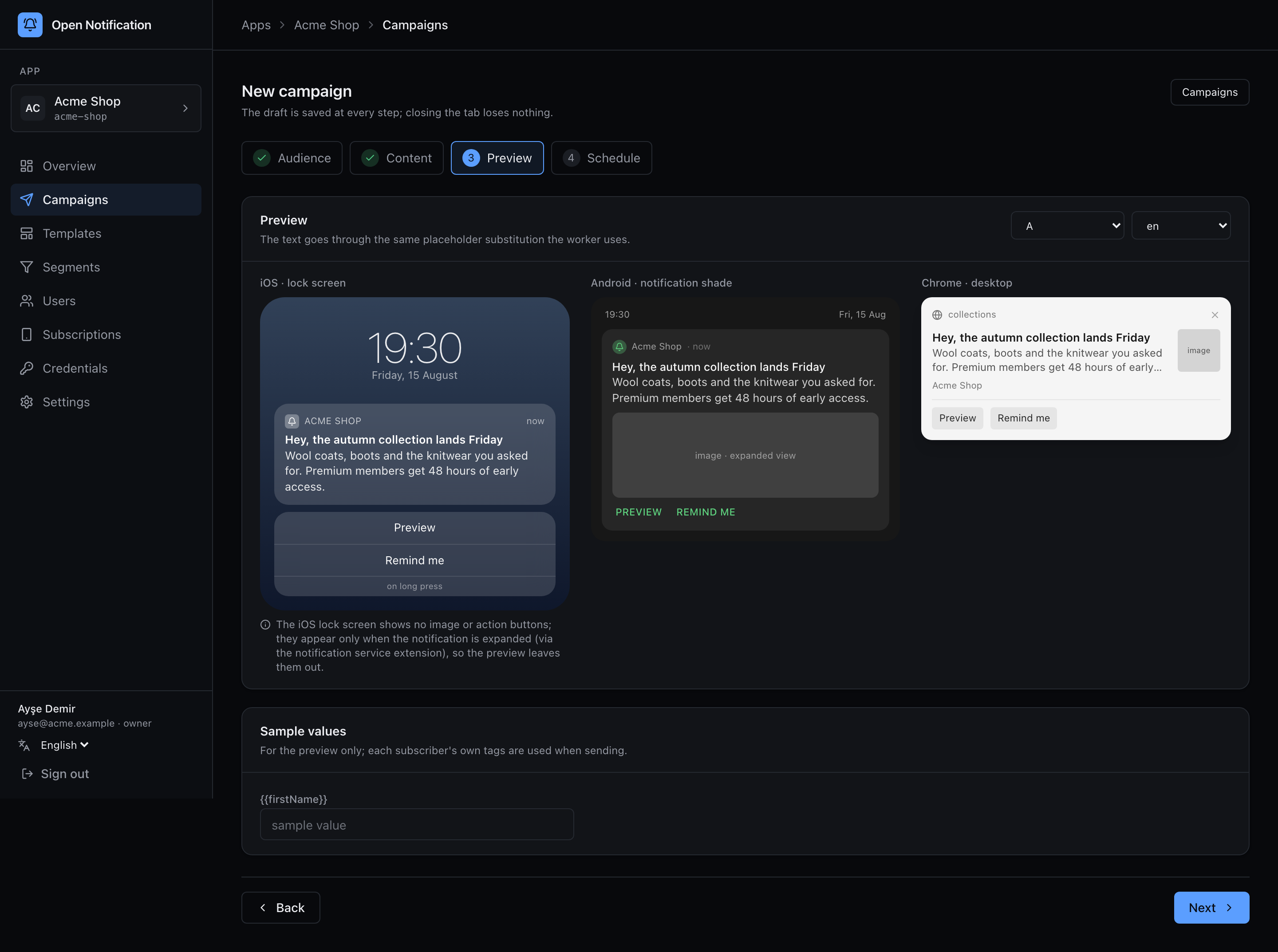
Device mock-ups for iOS, Android and a browser, per locale (Preview language). The text goes through the same placeholder function the worker uses (core/personalize.ts), so what you see is byte-for-byte what a device gets. Sample values lets you type sample tag values for the preview only; at send time each subscriber's own tags are used. Missing locales and empty titles are flagged here before you can continue.
4 Schedule
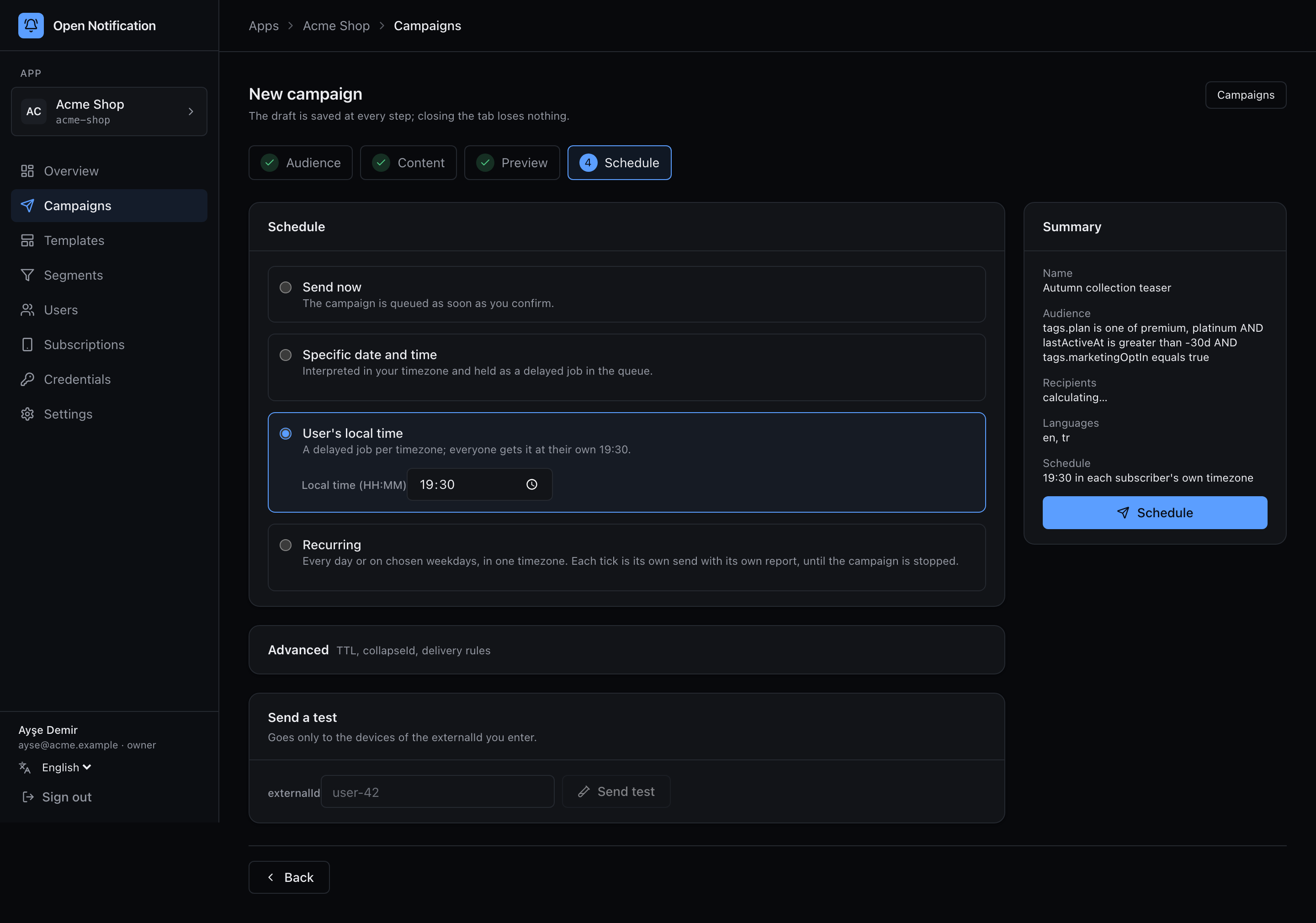
| Option | Behaviour |
|---|---|
| Send now | Queued as soon as you confirm. |
| Specific date and time | Interpreted in your (browser) timezone, stored as UTC, held as a delayed job in Redis. |
| User's local time | Enter a wall-clock time (19:30). Each subscriber gets it at 19:30 in their own timezone; subscribers without one use the app's default timezone, else UTC. Solved at fan-out per push, no per-timezone campaign copies. See Scheduling. |
| Recurring | Every day, or chosen weekdays, at a time in one timezone (defaults to your browser's), optionally until a date. Start makes the campaign active; each tick sends a run to whoever matches then. Stop it from the list or its report page. See Recurring. |
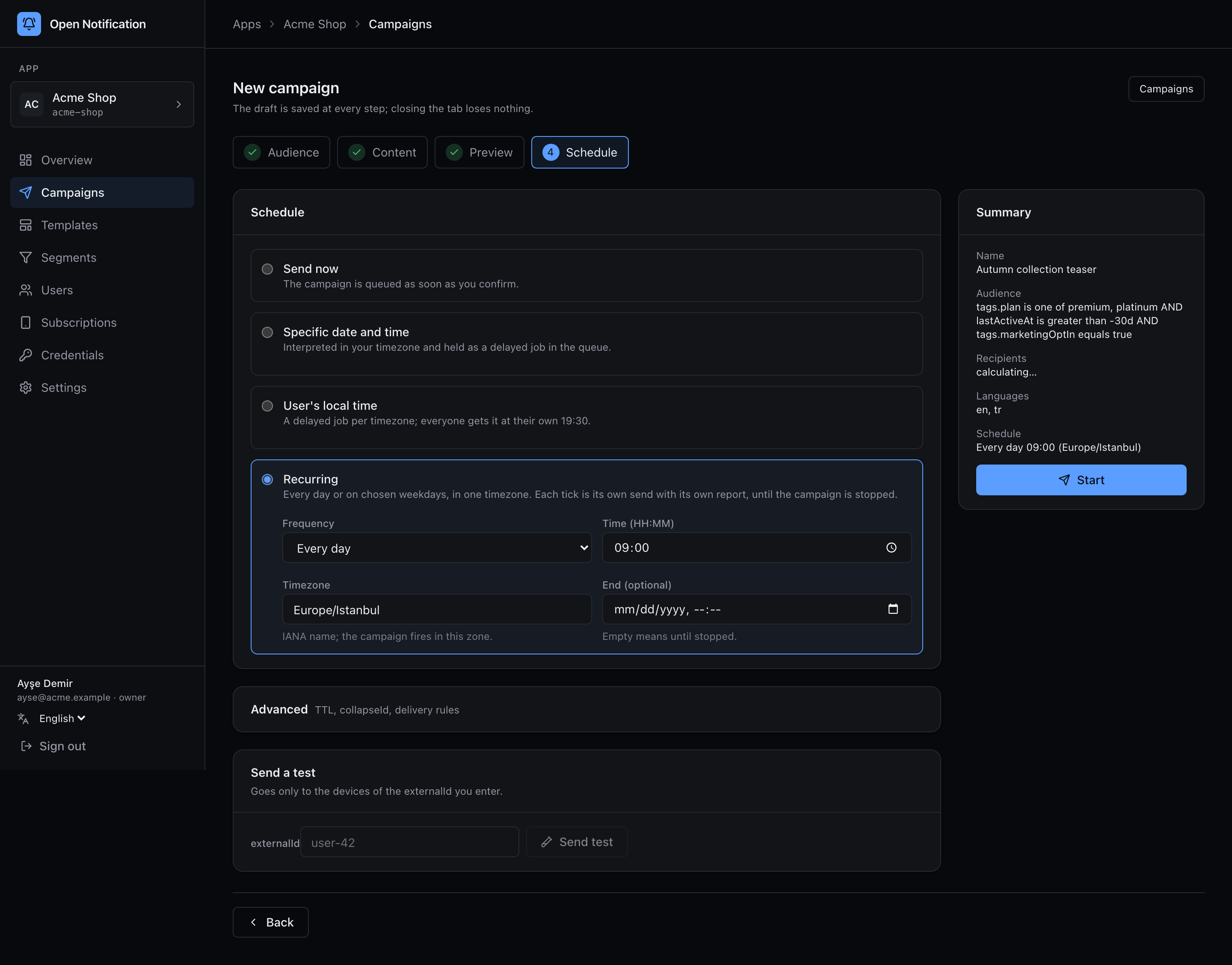
Advanced expands:
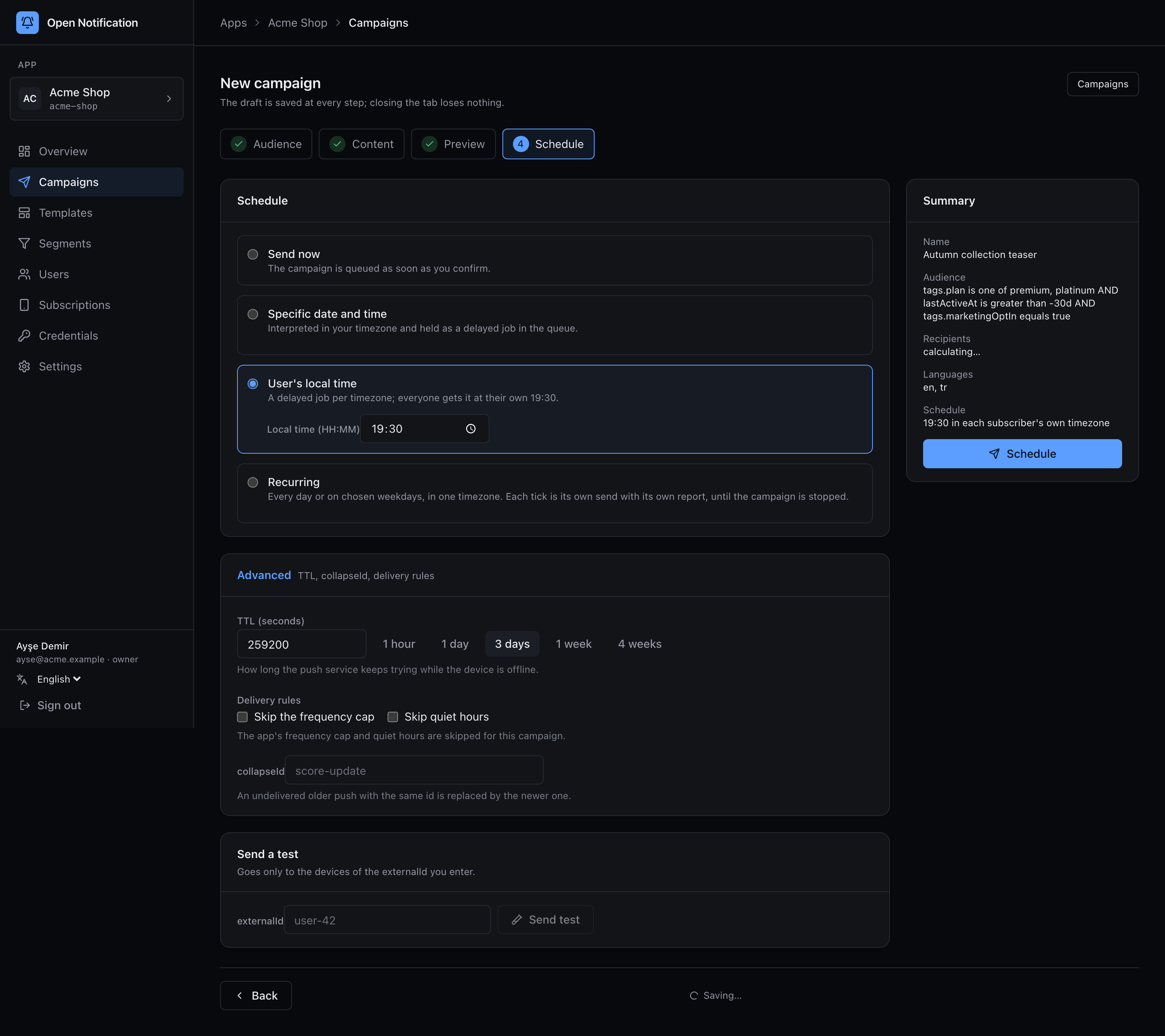
- TTL — how long the push service keeps trying while the device is offline (default 3 days; presets from 1 hour to 4 weeks).
- Delivery rules — tick to bypass the app's frequency cap and/or quiet hours for this campaign (a password reset must not wait until morning).
- collapseId — a newer push with the same id replaces an undelivered older one (
apns-collapse-id, FCMcollapse_key, webtag).
Send a test sends the current draft to every device of one externalId — yours — without touching the campaign's status or counters. The test is a separate transactional send and shows up in the list as such.
The summary card on the right recaps everything. Send / Schedule validates the draft against the strict content schema (all locales complete, URLs well-formed), writes the final content, and either queues or schedules. From here on the draft cannot be edited.
Editing and duplicating
A draft can be reopened from the list until it is sent. Sent campaigns are immutable — that is what makes their reports trustworthy. To send again, save the copy as a template and start a new campaign from it, or paste the DSL / copy from the report page.